- A gentle reminder email assumes the reader is busy, not ignoring you.
- Wait 2 to 4 business days for routine requests, less for urgent ones.
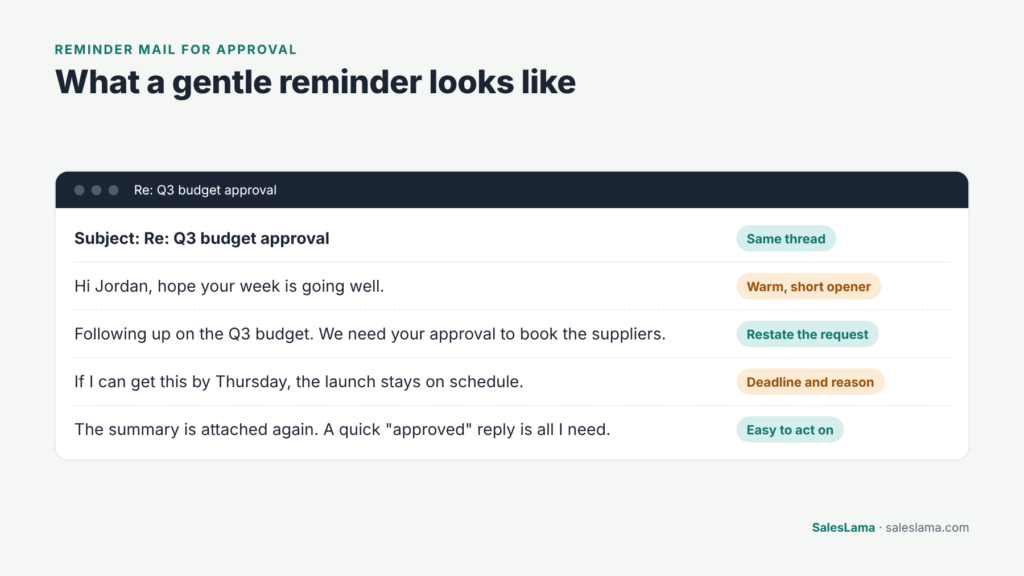
- Restate the request, mention the deadline and make it easy to act.
- After two or three reminders, change the channel or send a closing note.
Quick answer: A gentle reminder email is a short, friendly follow-up that restates your request, mentions any deadline and makes the next step easy. For routine requests, send it 2 to 4 business days after your original message.
You sent an email a week ago. You needed an answer, an approval, or a document. Nothing came back. Now you have to write again, and you want to do it without sounding annoyed, pushy, or desperate.
That is what a gentle reminder email is for. It nudges someone to take action while keeping the tone friendly and respectful. Done well, it gets a response and keeps the relationship in good shape. Done badly, it can feel passive-aggressive, even if you did not mean it that way.
This guide explains what a gentle reminder is, how to write one, and gives you reminder email templates for the most common situations.
What Does “Gentle Reminder Email” Mean?
A gentle reminder is a polite message that brings something back to a person’s attention. It assumes good intent. The idea is that the reader did not ignore you on purpose. They were busy, missed it, or forgot.
You might see people search for “gentleman reminder meaning.” That is usually a typo for “gentle reminder.” The phrase has nothing to do with gentlemen. It simply means a soft, courteous nudge.
Related phrases include:
- “Just a friendly reminder”
- “A quick reminder”
- “Following up on my last email”
- “I wanted to kindly remind you”
Some people find “gentle reminder” itself slightly formal or even a little pointed, especially when used repeatedly. In many cases, a plain “Just following up on this” sounds more natural. Choose the wording that fits your relationship with the reader.
Is it rude to send a reminder email?
No. Reminders are a normal part of work. Keep them short, friendly and focused on making the next step easy.
When to Send a Gentle Reminder Email
Reminder emails are useful in many everyday situations:
- You are waiting for an approval to move forward.
- Someone has not answered a question you need answered.
- You need a document, form, or information from someone.
- A payment or invoice is due or overdue.
- A meeting, appointment, or deadline is coming up.
- A prospect has gone quiet after showing interest.
How long should you wait before a gentle reminder email?
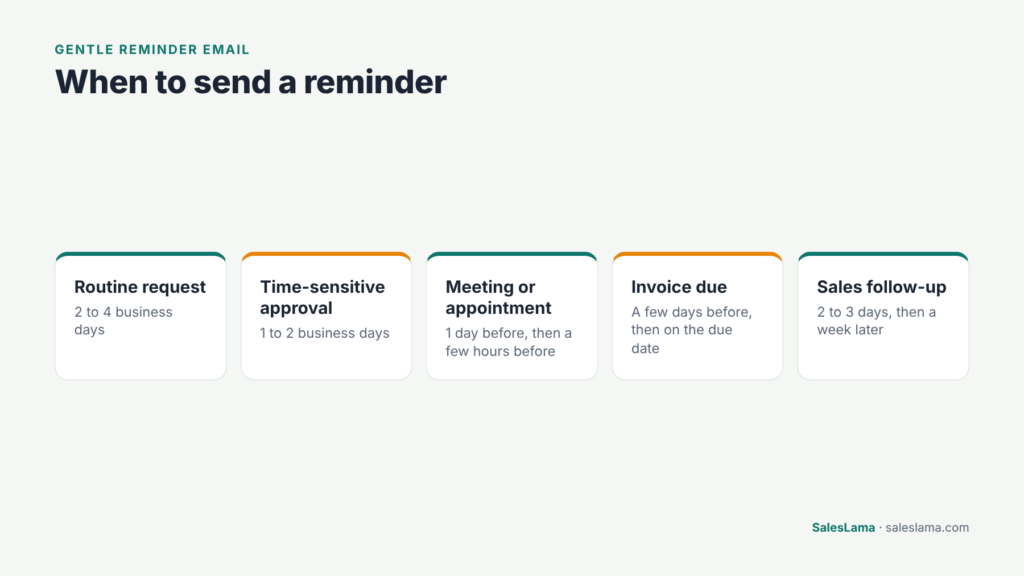
There is no fixed rule, but these timings are reasonable for most work situations:
Situation
When to send a reminder
Routine question or request
2 to 4 business days
Time-sensitive approval
1 to 2 business days, or sooner if the deadline is close
Upcoming meeting or appointment
1 day before, and optionally a few hours before
Invoice due
A few days before the due date, then on or after the due date
Sales follow-up
2 to 3 days, then about a week later
If something is urgent, say so clearly in the first email. That way, a quick reminder will not come as a surprise.
How long to wait before sending a reminder email
How to Write a Gentle Reminder Email
Follow these seven steps and your reminder will read as helpful, not impatient.
Use a clear subject line
Make it easy for the reader to see what this is about. Replying in the same thread is often best, because the original request is right there. If you start a new email, use a subject like:
- “Quick reminder: approval for the Q3 budget”
- “Following up: signed contract”
- “Reminder: our call tomorrow at 10 AM”
Open warmly
Start with a friendly line, but keep it short. “Hi Jordan, hope your week is going well” is enough.
Restate the request clearly
Do not make the reader dig through old emails. Briefly say what you need and why.
Mention the deadline if there is one
Deadlines help people prioritize. “If I can get this by Thursday, we can keep the launch on schedule” gives a reason, not just a demand.
Make it easy to act
Attach the document again, include the link, or ask a simple yes or no question. The less effort required, the faster you will get a response.
Close politely
Thank them and offer help if they need anything else.
Keep it short
A reminder should be shorter than the original email. Three to five sentences is usually enough.
Related read: Sales Pitch Email Examples That Get Replies
Gentle Reminder Email Templates
Here are templates you can adapt. Replace the bracketed text with your details.
Gentle reminder email for an approval
Template · Approval
Subject: Reminder: approval needed for [item]
Hi [Name],
I wanted to follow up on my email from [day] about [item]. We need your approval to [next step] by [date].
I have attached the details again here for convenience. A quick “approved” reply is all I need, or let me know if you have any questions.
Thanks so much,
[Your name]
Gentle reminder email when someone has not replied
Template · No reply yet
Subject: Re: [original subject]
Hi [Name],
Just bringing this back to the top of your inbox in case it got buried. I am still hoping to get your thoughts on [question].
If it is easier, I can set up a quick five-minute call instead.
Thanks,
[Your name]
How to remind someone to send you something
Template · Missing document
Subject: Following up: [document or item]
Hi [Name],
A quick reminder that I still need [document or item] to [reason]. Could you send it over by [date]?
If you are waiting on something from my side, just let me know and I will sort it out.
Thank you,
[Your name]
Email reminding someone to do something
Template · Task due
Subject: Quick reminder: [task]
Hi [Name],
Just a friendly reminder about [task], which is due on [date]. Here is the link you will need: [link].
Let me know if anything is getting in the way and I will help where I can.
Thanks,
[Your name]
How to remind someone who you are in an email
Sometimes you need to reconnect with someone you met briefly or spoke to a while ago. Remind them of the context in the first sentence so they do not have to guess. (Our sales introduction email guide has more first-contact examples.)
Template · Reconnect
Subject: Following up from the Spring Home Show
Hi [Name],
We met briefly at the Spring Home Show last month. I was the agent who chatted with you about first-time buyer programs near the Lakeshore area.
You mentioned you might start looking in the summer, so I wanted to check in and see if you would like a list of homes that fit your budget.
Best,
[Your name]
Payment reminder
Template · Invoice
Subject: Friendly reminder: invoice [number] due [date]
Hi [Name],
This is a quick reminder that invoice [number] for [amount] is due on [date]. You can find a copy attached, and payment details are included on the invoice.
If you have already sent payment, thank you, and please ignore this message.
Best regards,
[Your name]
Meeting or appointment reminder
Template · Meeting
Subject: Reminder: our meeting tomorrow at [time]
Hi [Name],
Just a reminder about our meeting tomorrow, [date], at [time]. [Location or video link.]
If you need to reschedule, reply to this email and we will find another time.
See you then,
[Your name]
Sales follow-up reminder
Template · Sales follow-up
Subject: Re: [original subject]
Hi [Name],
I wanted to follow up on the proposal I sent last week. I know these decisions take time, so no rush.
Would it help if I answered any questions on a quick call? Otherwise, I will check in again next week.
Thanks,
[Your name]
For a full cold outreach sequence, see our sales pitch email examples and follow-up plan.
Send reminders on schedule without writing each one
SalesLama sends appointment, payment and follow-up reminders by email, SMS or WhatsApp, and stops when someone replies.
Start your free trialGentle Reminder Email Phrases to Use and Avoid
✓ Helpful phrases
- “Just following up on this.”
- “Bringing this back to the top of your inbox.”
- “I know you are busy, so I have attached the details again.”
- “Would it help if I…”
- “Let me know if anything is unclear.”
! Phrases to use carefully
- “As per my last email.” Often reads as irritated.
- “Per my previous message.” Similar problem.
- “I kindly remind you.” Grammatically fine but can sound stiff. “I wanted to kindly remind you” or simply “Just a reminder” sounds softer.
- “Friendly reminder” with a cold tone. If the rest of the message sounds annoyed, the word “friendly” will not help.
- “Did you get my email?” Can sound accusatory. Better to assume they did and simply restate the request.
Tone matters as much as wording. If your reminders tend to come across as pushy, read what “salesy” means and how to avoid it.
What can I say instead of “as per my last email”?
Try “Just following up on this” or “Bringing this back to the top of your inbox.” Both sound helpful rather than irritated.
What If a Gentle Reminder Email Gets No Reply?
If you have sent two or three reminders without a response, try a different approach:
Change the channel
A short text or phone call may reach someone who is buried in email.
Simplify the ask
Ask a yes or no question instead of requesting a detailed answer.
Check you have the right person
Ask if someone else should handle the request.
Send a closing message
“I will close this out for now. If anything changes, feel free to reply.” This often prompts a reply because it removes pressure.
Automating Your Gentle Reminder Email
If you send the same types of reminders again and again, such as appointment reminders, payment reminders, or follow-ups after a quote, writing each one by hand takes time. It is also easy to forget one. Here is how to automate sales follow-up without losing the human thread.
SalesLama is a CRM and sales automation platform that can send reminders on a schedule by email, SMS, or WhatsApp. You can build sequences with waits between steps, send showing or appointment reminders before the booking, and use stop-on-reply so reminders end as soon as someone responds. Messages are written by you and personalized with details such as the person’s name, which keeps them from feeling robotic. You can start a free trial here.
Gentle Reminder Email FAQs
What is a gentle reminder email?
It is a polite follow-up that reminds someone about a request, deadline, or event without sounding pushy.
Is it rude to send a reminder email?
No. Reminders are a normal part of work. What matters is the tone. Keep it short, friendly, and focused on making the next step easy.
How do you politely remind someone to reply to your email?
Reply in the same thread, briefly restate your request, mention any deadline, and offer an easy way to respond, such as a quick call.
What does “gentleman reminder” mean?
It is usually a misspelling of “gentle reminder,” which means a polite, soft nudge to take action.
How many reminder emails should I send?
Two or three reminders spaced a few days apart is reasonable for most situations. After that, try a different channel or send a polite closing message.
Final Thoughts on the Gentle Reminder Email
A gentle reminder email works best when it is short, clear, and kind. Restate what you need, make it easy to act, and assume the other person simply got busy. Most of the time, that is exactly what happened.
If you send a lot of reminders and follow-ups, automating the routine ones can save you hours each week. Take a look at SalesLama and create your free account. Related reading: pitch email examples, writing a sales introduction email and how to avoid sounding salesy.
Ready to stop losing leads to slow follow-up?
SalesLama replies to new leads in seconds, follows up by email, SMS and WhatsApp, and hands hot leads to your team when they reply.
Start your free trial